HackPHS
I went to Princeton High School's hackathon!



What is HackPHS?
HackPHS is Princeton High School's annual 24-hour hackathon, organized by students. It is hosted every year at Princeton High School, on Princeton University's campus. This year (2025) was their return from a three-year long hiatus. The best part is that people from all across New Jersey came to participate and it was completely free, thanks to the sponsors!
The Theme
The theme this year was nature, communication, and "Into the Mountains". Thankfully, it was announced ahead of time, meaning we could plan ahead. Devansh and I knew that we had to do a hardware project for a few reasons. Firstly, it's the most impressive and fun. Secondly, I have a lot of tools and electronics that we could use to make something pretty cool. Thirdly, it's great to learn how to go through the entire engineering process in such a short timespan. We stayed after school for an hour at the library to think of ideas based on what I had and we finally settled on a weather station.
Brainstorming
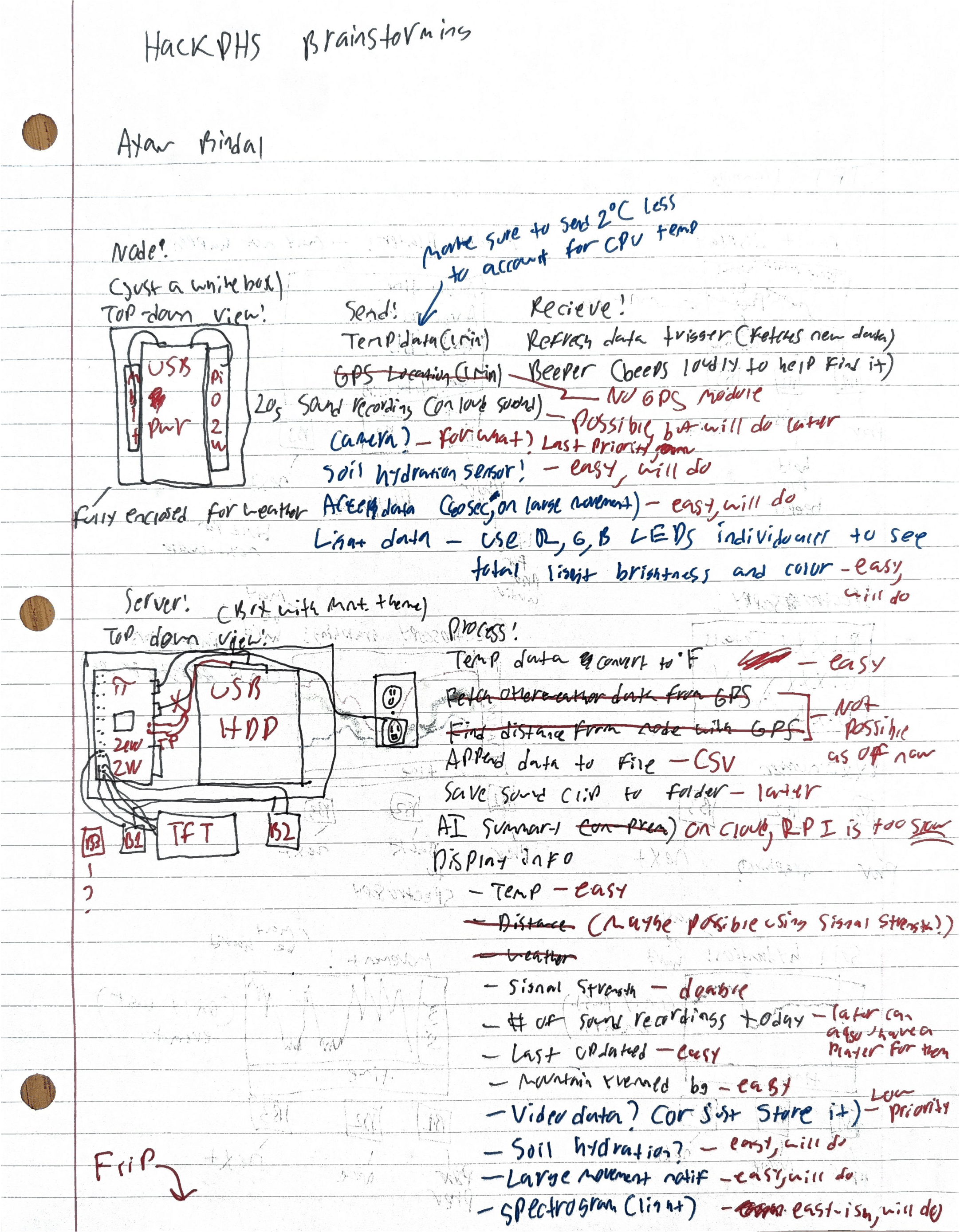
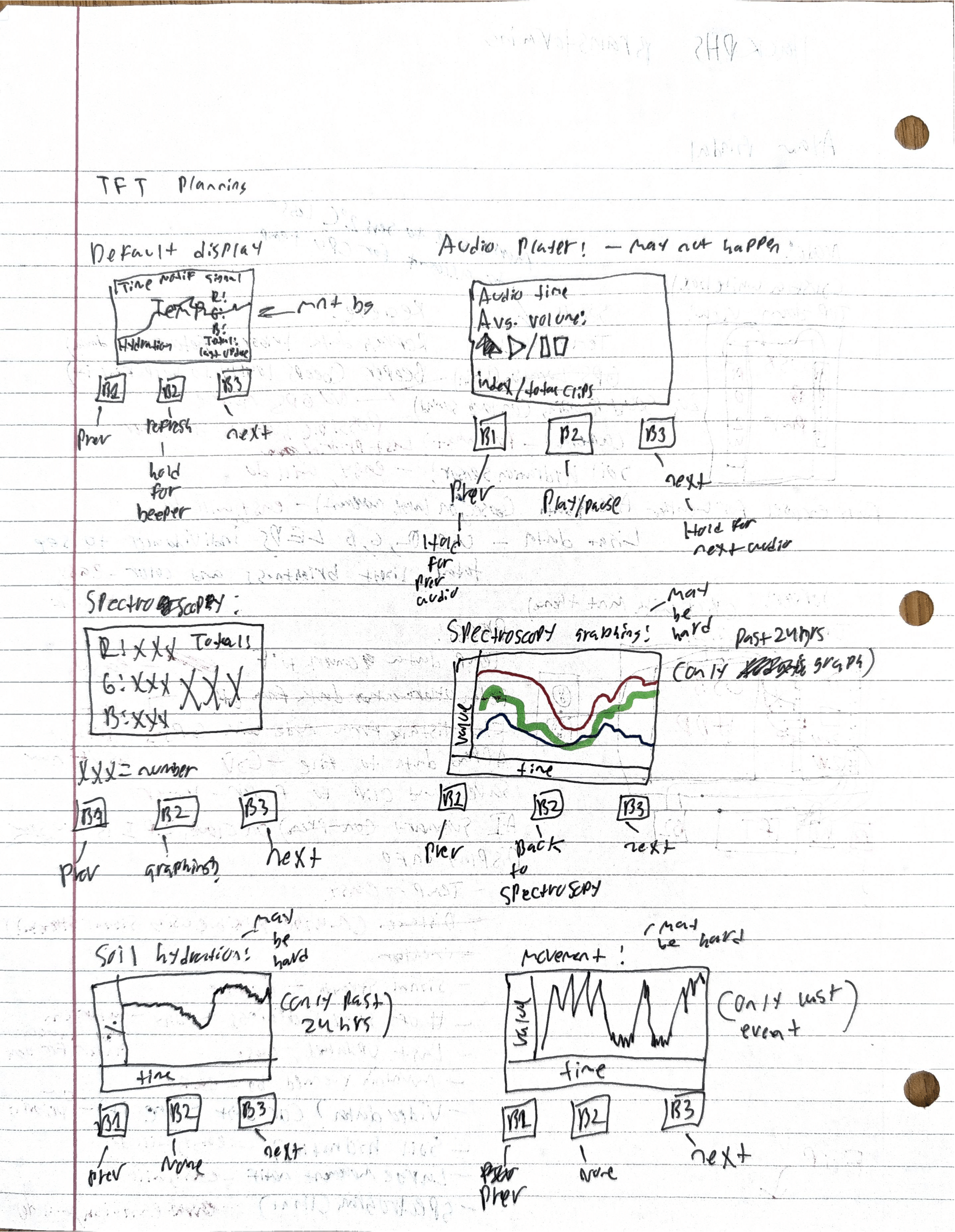
I ended up doing most of the brainstorming myself after some state field testing (on Halloween), so I had a lot of time to think of how everything would work together. I grabbed a scrap piece of paper, my pens, and my highlighters and got right to work. I knew I had to have two parts, a "node" that would actually collect and send the data, and a server that would receive, process, and display that data. I ended up creating a diagram of both along with their functions and some notes about each function. (Watch the YouTube video for a full explanation). On the back, I thought of some things to put on the screen and how that would all function with the buttons. Overall, I felt pretty confident in my ideas by the end of it.
The Morning
I woke up early on November 1st, ready to go. I finished packing everything and then got ready to pick Devansh up and go to PHS. We got there, got signed up, and got set up fairly quickly. I started setting up my tripod and camera to record while Devansh got his laptop out. I then spent the morning recording my walkthrough of the brainstorming sheet and then getting to work.
The Dreaded USB-A Female Connector
If you don't know, the Raspberry Pi Zero 2W, the Raspberry Pi Foundation's extra-small single-board computer (SBC) doesn't have a single USB-A port. That means that if I want to connect my hard drive to it, I either need an adapter to Micro-USB (which I somehow don't have), permanently attach the drive's wire to the Pi (which is a horrible idea), or find a way to add a port. Thankfully, there's some test points that allow you to add a port, the problem is I don't have one. So there I was, trying to strip the wires of a USB-A splitter, which, for some reason, loved to KEEP. FREAKING. BREAKING. At this point, I was honestly fed up (even Devansh tried and couldn't strip it / solder the wires without them breaking instantly) and decided to go to CVS to see if they had any adapters. No luck. Then I went to an office supply store, no luck again. Thankfully that fresh air helped me realize that I could try to break the plastic housing around the connector itself and use the pins on the PCB rather than the wires coming off of it. Unfortunately, I ended up getting a pretty gnarly gash on my finger which made it a LITTLE harder to type and work with my tools. The worst part is that I did something similar while trying to open something else with the exact same screwdriver, and the result was the exact same. Anyways, I finally managed to get the connector open, was able to solder the wires easily, and plug everything together. (Connecting the hard drive itself is gonna be a whole 'nother section because of how insanely stupid it was).
And now, we feast!
It was finally lunch time. I ate two slices of pepperoni pizza along with a cookie. I honestly don't really know what kind of cookie it was, but it appeared to have a marshmallow filling. After that, Devansh and I thought that we should get a treat before we continue working, so we began our journey to Halo Pub. For those of you who don't know, Halo Pub is THE ice cream spot at Princeton. They also have coffee, hot cocoa, and cider (during the fall season). Basically, they've got a lot of stuff and it's amazing and fresh. We actually ended up getting the same thing because it was his first time there and I ALWAYS get the ice cream so I wanted something different. I'd never heard of this, but we both got a hot cocoa float. I got mine with coffee ice cream and it was amazing. The whipped cream added a nice bit of flavor that contrasted well with the blend of hot chocolate and cold coffee to create a heavenly elixir. Anyways, we finished eating/drinking it on the way back and got back to work.
Hard Drives Are Hard
Now, back to the hard drive. Although I had physically gotten all of the wires soldered in the right spots for the USB port, and I could tell the drive was receiving power, I couldn't actually see the drive at all. Listing active drives showed nothing, regardless of what command I used. I couldn't find any Seagate drives. However, after a lot of trial and error, I ran a command that allowed me to see each drive's ID. ls -l /dev/disk/by-id. Finally! I saw the Seagate drive and its path. I could finally properly initialize the drive, which let us actually store the sensor data over there.
Makin' Mountains
The CAD was actually pretty fun. I tried using a different mechanism to attach one half of the case to the other. I had brought heatset inserts but really didn't want to use them, knowing how finicky they can be. I ended up having protrusions from the sides of the cases with a small hole, perfectly sized for a screw and nut. By putting matching protrusions on the top and bottom of the cases, I could easily and quickly tighten them down, without too much work in CAD or too much assembly time. Originally, I was only gonna make the server case while Devansh made the node case, but he was really struggling with Blender. He even tried going to the Blender workshop but it just didn't click for him. I even tried making a little cheat-sheet for him so that he could see all of the commands, but the fundamentals themselves weren't compatible with him. Thankfully, I was able to quickly make his case, and ended up opting for a design where it's just a box and everything HAS to fit in there, regardless of how. I just made some holes on the top for the LEDs along with 2 holes on the bottom for the electrodes. I even ended up getting a little fancy and made some slots on the inside of the case that would allow you to easily solder to the tops of the screws after they're already fully installed. My case, on the other hand, needed to look good. It was what you interacted with, you had to see it all of the time. Devansh, for some reason, couldn't get it in his head that we weren't building a PORTABLE SERVER but just a simple server. After I took care of that, I was able to start designing the case in a way that made sense for the both of us. First, I started with the hard drive, turning that into the bottom of the case itself. Then, I worked on the top where the screen and buttons would go. I also needed to put the Pi and the wires somewhere, so I made some space between the top and bottom and used that cavity as the storage. Originally, there were going to be standoffs that were printed, but they were too thin to be viable, hence why there are some indentations on the final print. Finally, I had to make the mountains themselves. I asked Devansh to take my tablet and sketch something out, and then I put my headphones on and started tracing. After enough time, I got a good model made, but I had to figure out how to get the snow and grass as two different parts. I only had white PETG and green PLA, with the PETG having some printing issues. Thankfully, I was able to create two parts that glued together to create some beautiful mountains, after shaving the edges down a bit with my deburring tool. At last, I had finally designed a case that was functional, compact, and aesthetic.
No ADC? No Problem!
Looks aren't everything, though. We had some MAJOR problems with the node. We were confident that the Pi would have analog inputs that we never even bothered to check. Surprise! They don't. So now what? Thankfully we had my Wemos C3 Mini. This meant temporarily getting rid of any/all internet access to the server, but it let us have SOMETHING for a node. The C3 Mini had just enough pins for everything to work, and after some fairly annoying soldering, it was ready. At this point, it was pretty close to submission time and we were rushing to port the code to Micropython. Thankfully, we got it done in time.
Printing
While all of this was going, I was running between our table and upstairs where the A1 Mini was. Here's the thing, I started printing around midnight, which is completely fine. That is, until you realize how many vertical components are on my case, and the poor condition of the printer. That meant that my PETG would warp and fail no matter what. I even brought my own build plate but it still didn't work. The nozzle (which I didn't bring) was fully destroyed, and it was far too late to get one from home now. This meant that I had to be dialling in my print settings and speeds to get everything right, especially with my failed prints and design iterations. I actually got the last print (part of the node case) done a few minutes AFTER the submission time, which is exactly why it's not in the demo video. Thankfully, the prints actually turned out decent when I used Bambu Labs' own filament.
Presenting
After we submitted, it came time to present. Honestly, we weren't ready, and I kinda forgot that we even had to present at all. After looking at the state of our project, I knew that we had to wow the judges with the presentation itself. I quickly tasked Devansh with making a slideshow (available to download at the top) while I cleaned everything up and organized it so that the judges could easily follow our process and our result. Thankfully, the presentations were actually fairly smooth, as long as I made sure that we made sense, it was all good.
Here are the videos:
Closing Ceremony
The closing ceremony was actually really interesting. There were a lot of delays because it took a while to get the judging completed. At one point, a volunteer confirmed our team name, which confused us. Then, he said, "Well, I might as well tell you right now" and just told us that we got a perfect score on the rubric. Devansh and I were shocked and were super happy with that, and then we asked, "So does that mean we won"? He simply responded with "Yes" and that was it. We genuinely couldn't believe it! I quickly set up my phone and tripod to record the closing ceremony (unbeknownst to me, my storage was almost full) as we waited for our names to be called. Every single minute felt like hours. The excitement was building up and they finally called our name. Honestly, I was just as happy that I got on on video.
Closing thoughts
Overall, the hackathon was super fun. Even though there were good times and frustrating times, we got through it. It was a little annoying to set my laptop up for Blender and git (I had recently switched to Arch with Hyprland and GNOME) during the hackathon but it wasn't too bad. Although I am a little sad about our programming progress, I feel like we all learned a lot, and I feel a lot more prepared for future hackathons now, especially with two out of two wins under my belt. I'd like to end this by saying thank you to the judges, to the volunteers, and even to the participants. Without everyone, this wouldn't have been possible, and I'm truly grateful that I got to participate in such an amazing event. However, next time, I'll probably sleep a bit more.